WordPress LMS plugin by AyanTheme
Turn your WordPress site into an online school
Build courses in a focused Course Builder, sell them without WooCommerce and issue certificates anyone can verify. One plugin with everything included, bought once.
$99 one-time
One click signs you in as a student, instructor or admin. Nothing to register; the demo resets every hour.
- Translations
- German, Turkish, Arabic; full RTL
- Accessibility
- WCAG 2 AA contrast
- Checkout
- No WooCommerce needed
- AI assistants
- Claude, ChatGPT via MCP
01
One plugin. Every part a school needs.
Teaching, selling and running classes ship together. There is no Pro tier and no add-on store.
- AI
AI assistants (MCP)
Build courses, manage students and read reports by chatting with Claude, ChatGPT, Codex or Cursor. Built in, off until you turn it on, drafts until you publish.
See how it works - Teach
Course Builder
Chapters and six lesson types at /studio/, outside wp-admin.
- Teach
Lesson player
A full-page player with progress, resume and auto-advance.
- Teach
Quizzes
Scored on the server. Multiple choice, true/false, short answer, essay.
- Teach
Self-tests
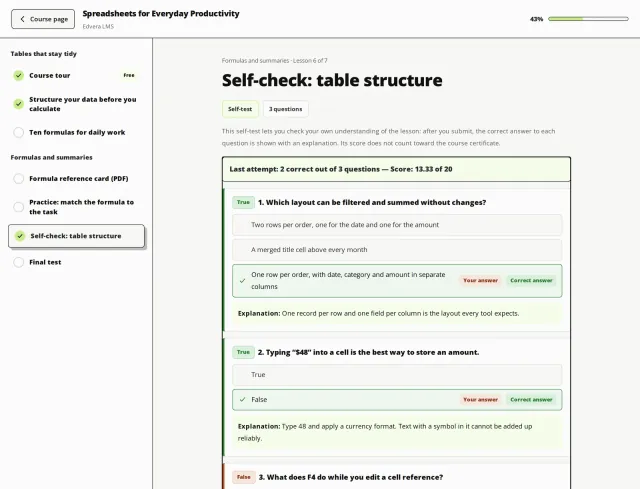
Practice quizzes that show the right answer and an explanation.
- Teach
Assignments
File uploads or answer sheets, graded with feedback.
- Teach
Drip and prerequisites
Open lessons on a date, days after enrolment or after others.
- Teach
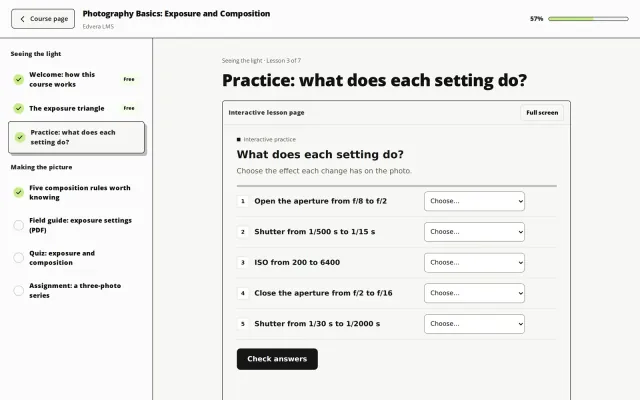
Interactive pages
Upload one HTML file as a lesson; it runs in a sandbox.
- Teach
Q&A and video notes
Lesson questions answered by instructors; private bookmarks.
- Run
Management panel
Enrol, bulk-enrol from CSV, grade and issue certificates at /manage/.
- Run
Cohorts
Named class runs with a session schedule on the dashboard.
- Run
Reminders
Emails for inactive students and quizzes still waiting.
- Run
Points and badges
Points, six badges, day streaks and a leaderboard block.
- Run
Reports
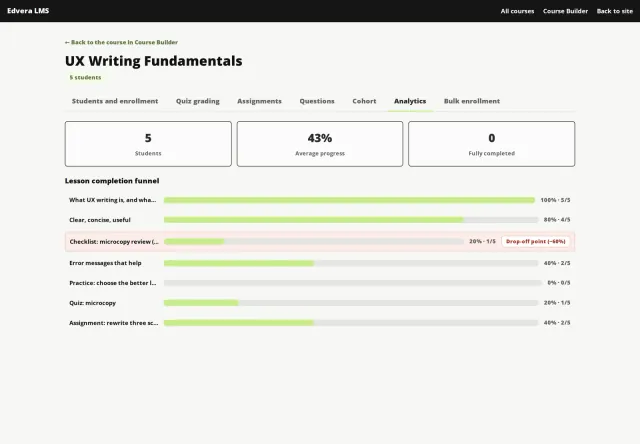
A completion funnel per lesson; quiz answers as CSV.
- Protect
Secure video
Stream-only uploads with a moving name watermark.
- Protect
Protected downloads
Files outside the Media Library, sent by signed links.
- Protect
Verifiable certificates
PDFs with a QR code and a public verification page.
- Sell
Built-in checkout
Stripe, PayPal and bank transfer. Guests welcome.
- Sell
Coupons
Percentage or fixed, expiry, limits, minimum order, item rules.
- Sell
Bundles
Sell courses and files together; later additions reach past buyers.
- Sell
Downloads
Sell or give away e-books, templates and worksheets.
- Platform
Appearance
Accent, dark colour, background, corners and font for every screen.
- Platform
Shortcodes for any site
17 blocks and shortcodes: best sellers, free or on-sale courses, as a grid, list or compact list.
- Platform
Translations included
German, Turkish and Arabic next to English, with full RTL.
- Platform
Privacy tools
Five exporters and three erasers for WordPress's privacy tools.
02AI assistants (MCP)
Build and run your school by chatting with AI.
Edvera has a built-in MCP server, so AI assistants can work on your site. Ask in plain words: the assistant drafts outlines, chapters, lessons of every type, quizzes and media; enrols students, grades work, answers questions and issues certificates; and reports on progress, drop-off, learners at risk and sales. 42 tools, inside WordPress, with no extra service to run.
Works with, through MCP
- Claude
- ChatGPT
- OpenAI Codex
- Cursor
- n8n
- Any MCP client
- Off until you turn it on. Claude and ChatGPT connect when you sign in to your site and approve; Claude Code, Codex, Cursor and n8n use an API key.
- Every connection acts as one WordPress user, with the permissions you pick (read, content, students, commerce, analytics) and never more than that account may do. Instructors reach only their own courses.
- What the assistant creates stays a draft until you say publish. Removing a course, a lesson or a student's access needs your yes.
- Keys are shown once and stored hashed. Rate limits, a sign-in lockout and an activity log of every call; revoke a key or disconnect an app at any time.
- You
Turn my workshop notes into a beginner course with a quiz after each chapter. Keep it as a draft.
edvera_create_courseDraft “Photography Basics”, 2 chaptersedvera_add_lesson7 lessons and 2 quizzes, as draftsedvera_preview_linkCourse Builder and player preview- Assistant
Done: 2 chapters, 7 lessons and 2 quizzes. Review them in the Course Builder. Shall I publish the course?
Draft - You
Not yet. Who is falling behind in Public Speaking?
edvera_report_learners4 inactive for 14+ days, 2 never started- Assistant
Four students have been away for over two weeks; three of them stopped at “Speaking without notes”. Shall I draft replies to their open questions for you to approve?
03Course Builder
Build courses in a panel made for teaching.
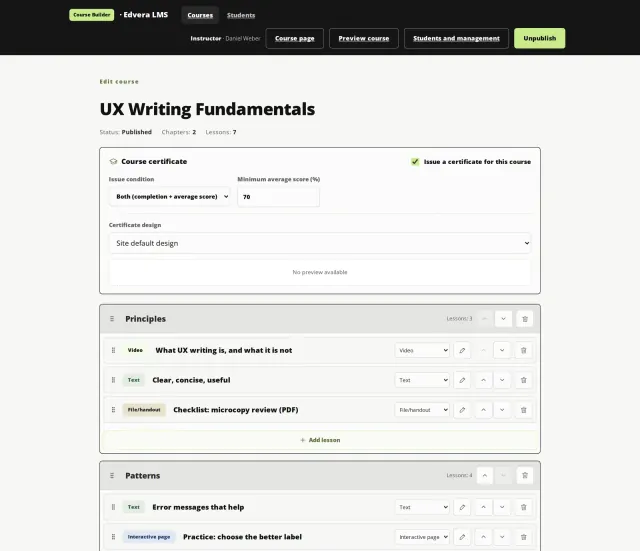
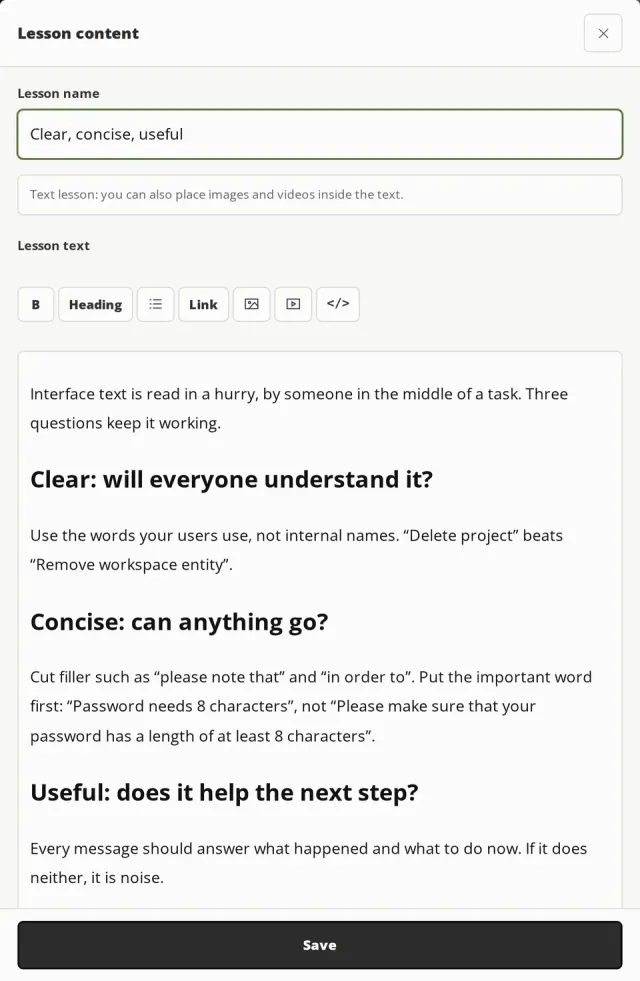
The Course Builder lives at /studio/, outside wp-admin. Instructors add chapters, drag lessons into place and edit each one in a single dialog, without a WordPress settings screen in sight.
- Six lesson types: text, video, file, quiz, assignment and interactive page.
- Drag and drop, or move lessons with the keyboard. Every change saves by itself.
- New lessons stay drafts until you save them, so students never meet an empty lesson.
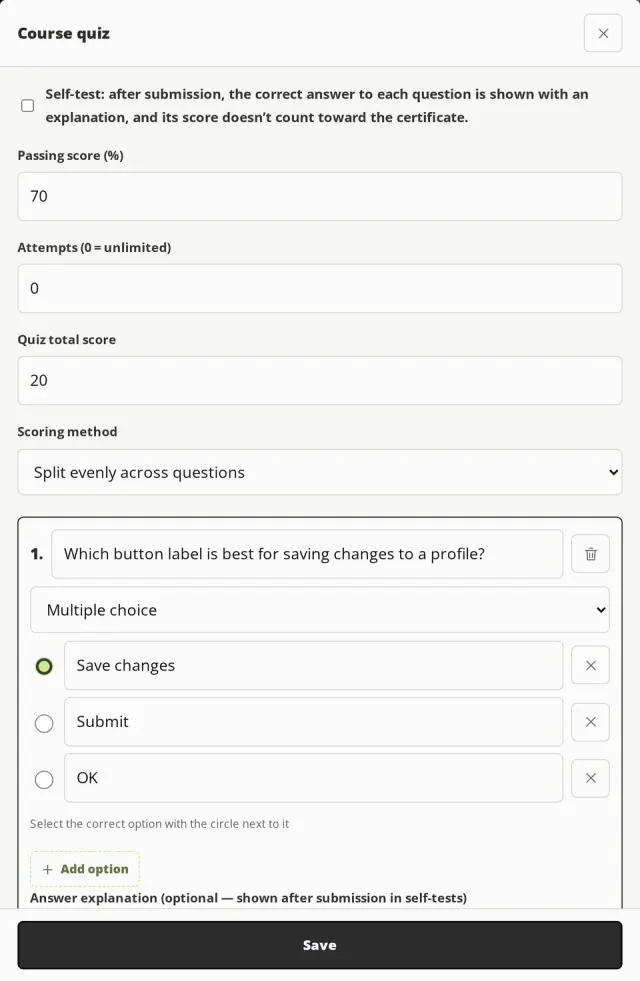
- Quizzes with essays graded by hand, practice self-tests, and JSON import and export.
04Lesson player
A player that keeps students moving.
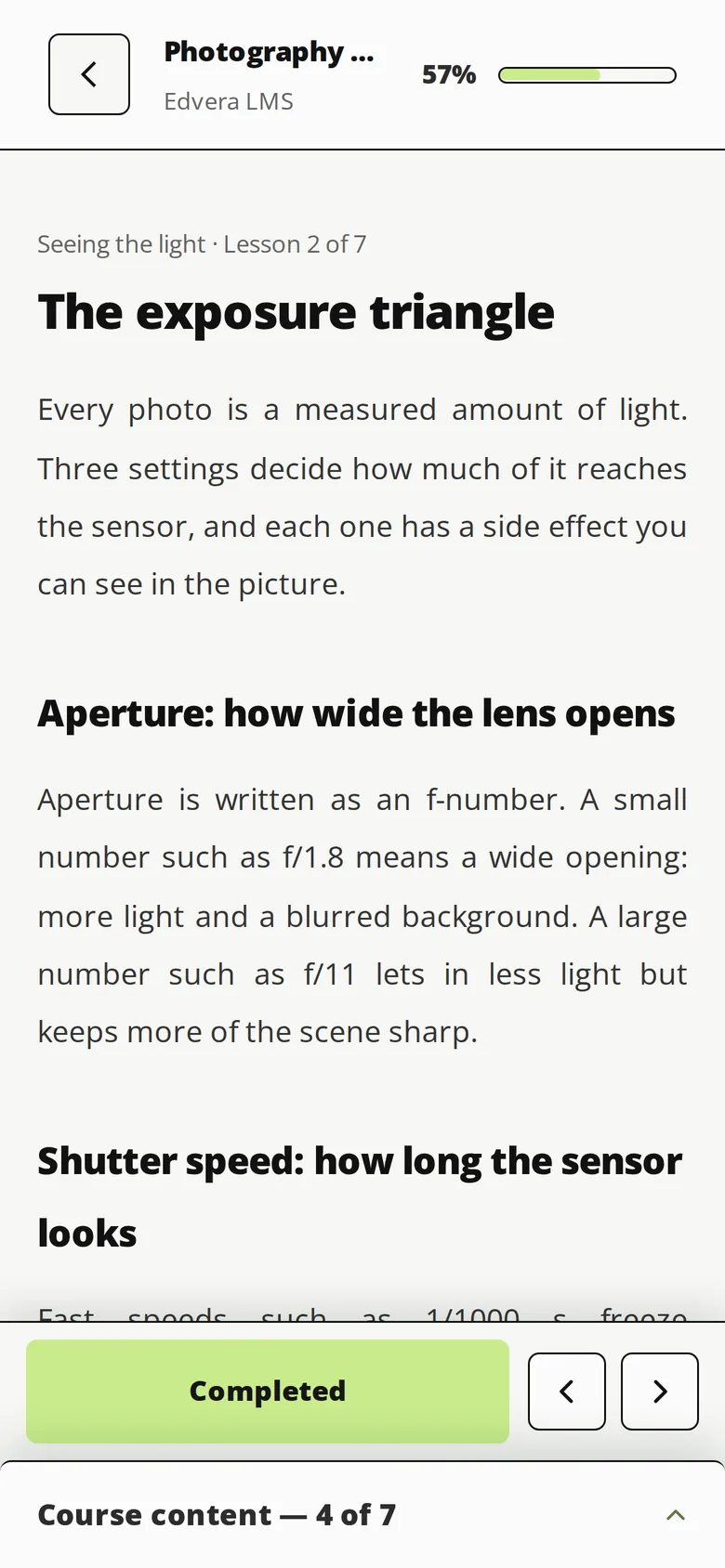
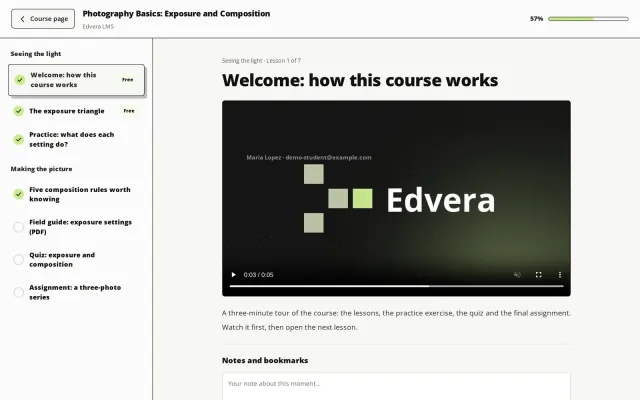
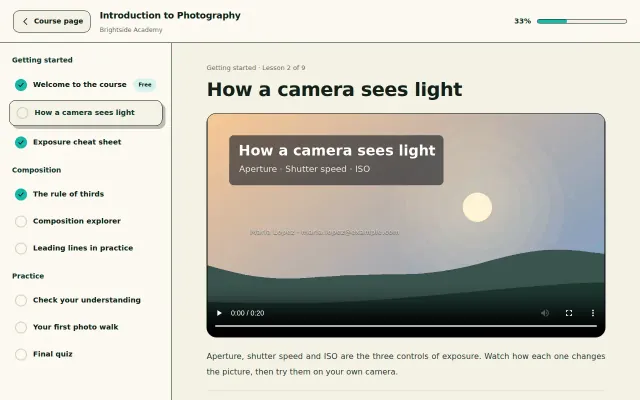
Students learn at /learn/, a full page of its own: the curriculum on the side, progress on top and the next lesson one click away. Your theme's header and footer stay out of the way.
- Students resume where they stopped and move on automatically after each lesson.
- Video lessons complete at 90% watched, checked on the server, so skipping to the end doesn't count.
- Release lessons on a date, a number of days after enrolment, or once earlier lessons are done.
- Self-tests show the right answer and an explanation for every question.
05Interactive pages
Teach with your own interactive pages.
Upload one self-contained HTML file as a lesson: a simulation, a concept map or a drag-and-drop exercise you built anywhere. Students open it in a sandboxed frame with a Full screen button.
- The page has no network access: it cannot load from the internet, read your site or send data.
- Each viewer gets a personal link that expires after four hours.
- Up to 10 MB per page, or your server's upload limit when it is lower.
06Management panel
Run classes from one panel, not a spreadsheet.
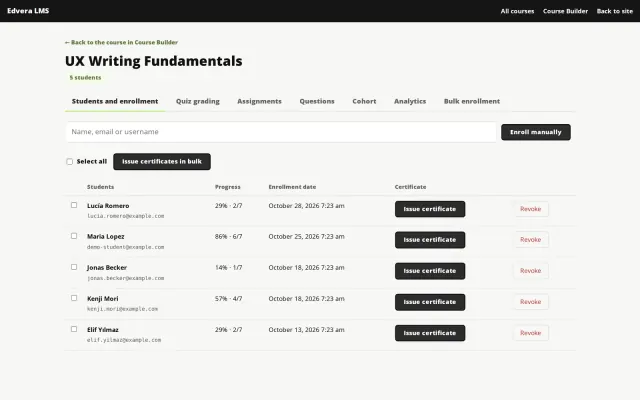
Instructors and course managers handle students at /manage/: enrol people, grade work, answer questions and see exactly where a course loses its students.
- Bulk enrolment from a pasted list or a CSV file, in batches of 25.
- Grade essays and assignments with feedback; issue certificates by hand or in bulk.
- Cohorts with a class schedule, plus reminder emails for students who stall.
- A lesson-by-lesson completion funnel that flags the biggest drop-off.
07Secure video and files
Protect the work you sell.
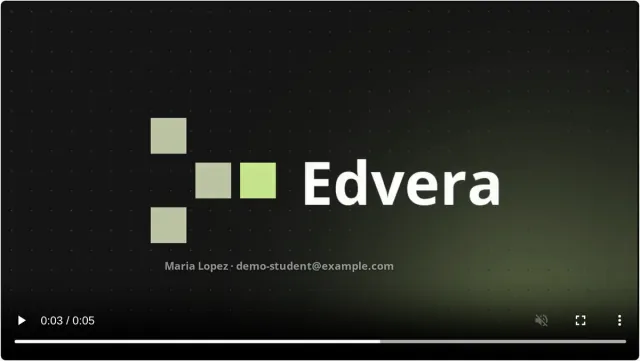
Uploaded videos stream only to students with access, with the student's name and email moving across the picture. Lesson files and downloads sit outside the Media Library under random names.
- No download button and no picture-in-picture. Requests for the file itself get 403 Forbidden.
- The moving watermark discourages screen recording. It is a deterrent, not DRM.
- Downloads use signed personal links that expire after one day.
- Optional per-course protection blocks selecting, copying and printing lesson text.
08Appearance
Looks like your brand, on any theme.
Choose an accent, a dark colour, a background, corners and a font once, and every Edvera screen follows. Text colours are picked for readable contrast, so a bright accent never leaves white text unreadable.
-
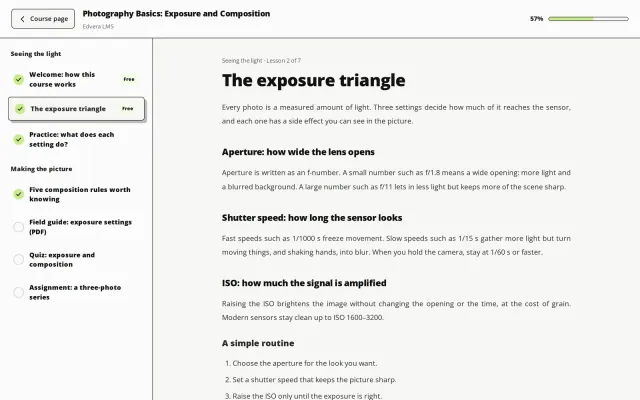
Lime on charcoal, square corners (the demo) -
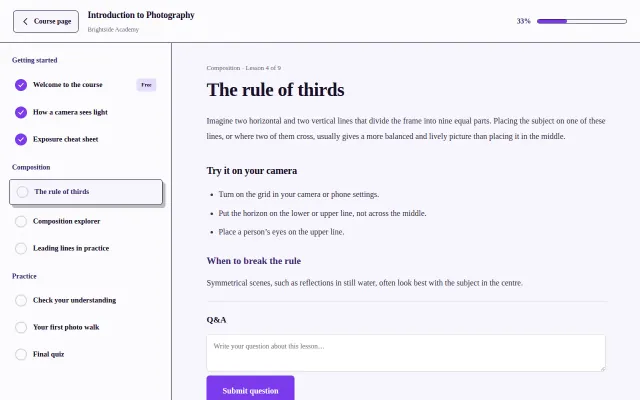
Violet accent, Georgia, square corners -
The built-in look
09Selling
Sell without WooCommerce.
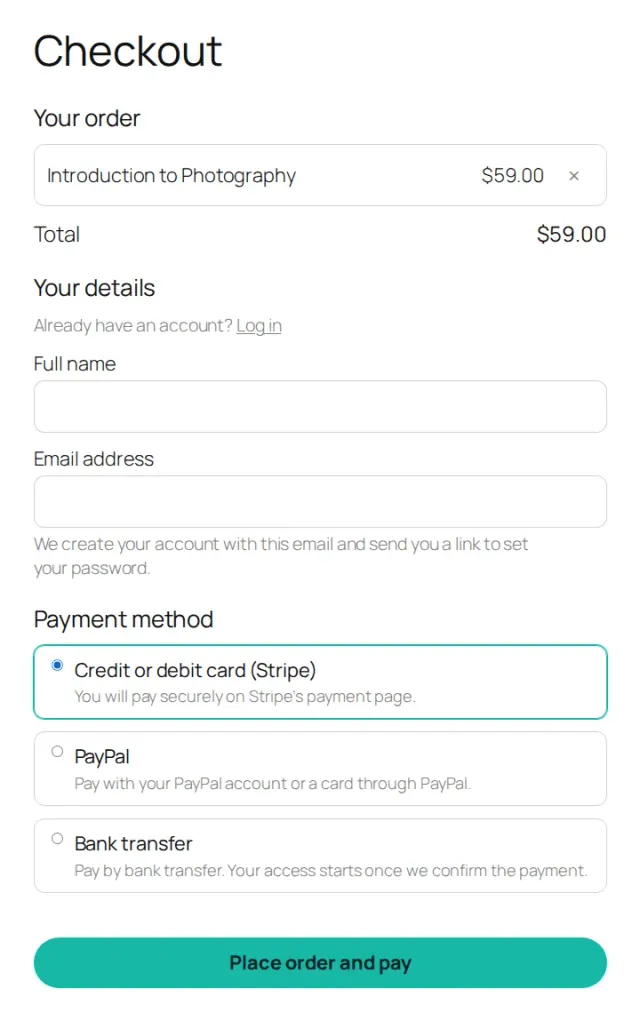
The checkout is built in. Buyers pay on Stripe's or PayPal's own page, and access starts only once the payment is confirmed on your server.
- 01
Cart
Courses, bundles and downloads go into one cart, with a coupon field while a coupon can be used.
- 02
Pay
Stripe Checkout with cards, Apple Pay and Google Pay, PayPal or bank transfer, in about 50 currencies. Card details never reach your site.
- 03
Access
Granted after server-side confirmation. Guests get an account and are signed in on the receipt.
- 04
Refund
One click on the order. Edvera withdraws only what that order gave; access from other grants stays.
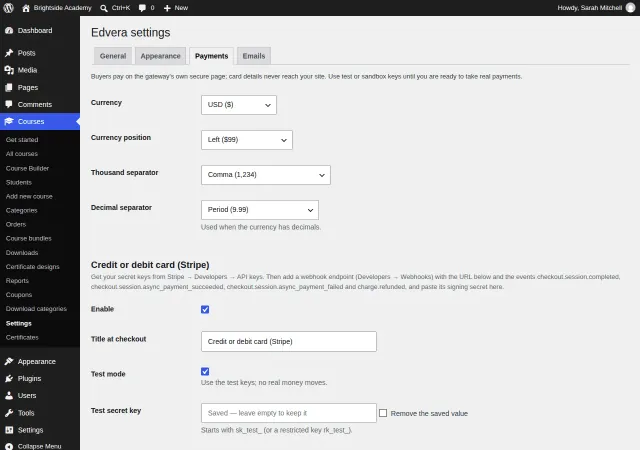
- Keys checked before launch
- Test connection asks Stripe or PayPal whether your keys work, and a key pasted into the wrong field is refused.
- Free and $0 orders
- A free item or a 100% coupon completes without a payment method.
- Bundles
- Courses added to a bundle later reach everyone who bought it.
- WooCommerce optional
- Link any item to a WooCommerce product to use its gateways.
10Certificates
Certificates anyone can verify.
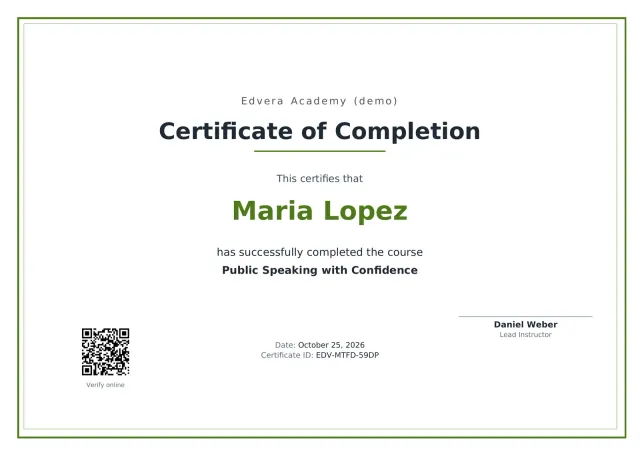
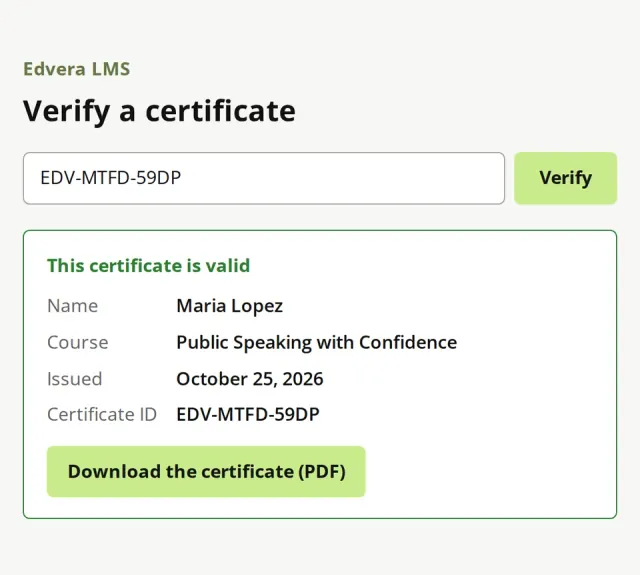
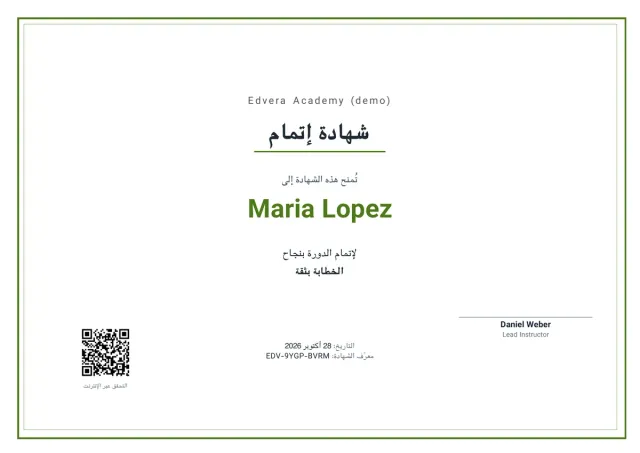
Every certificate is a PDF with a unique ID and a QR code that opens a public verification page. Revoke one and it stops verifying at once.
- Issue on completion, on an average quiz score, or both.
- Your logo, signer and signature. Designs in HTML with placeholders, on A4 or US Letter.
- Bundled fonts print names in Latin, Arabic-script, Hebrew, Thai and Indic scripts; an optional font pack in the download embeds Chinese, Japanese and Korean.
- Right-to-left certificates are laid out right to left, in the language of the site.
11Languages
German, Turkish and Arabic in the box. Right to left done right.
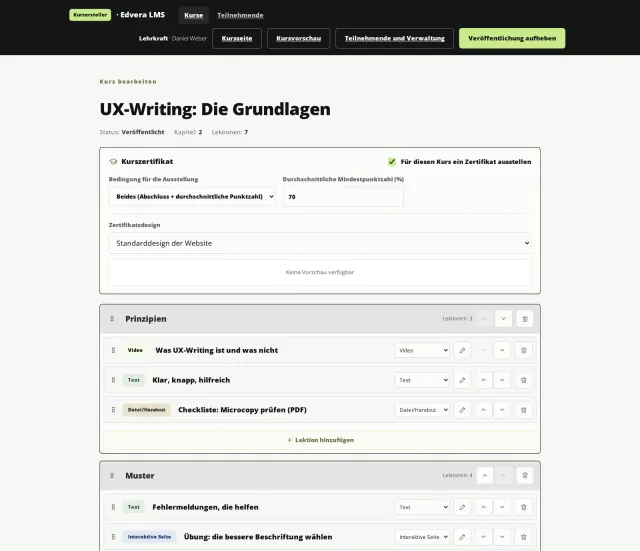
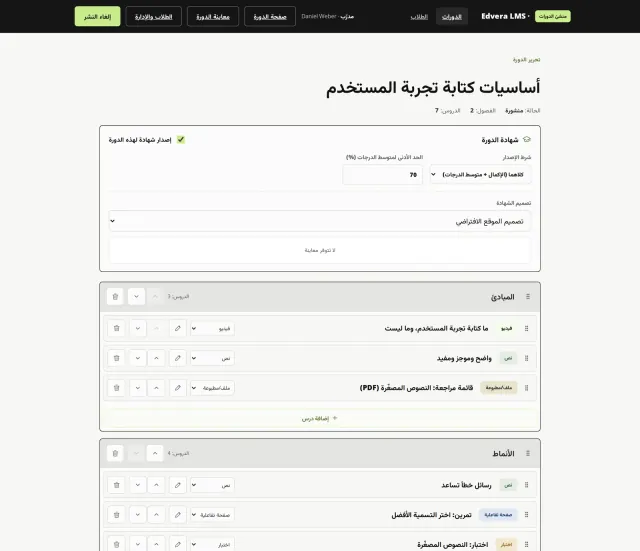
Edvera ships complete German, Turkish and Arabic translations next to English, for every screen, email and certificate. Layouts and directional icons mirror for right-to-left languages.
-
English -
Deutsch -
العربية
- German uses the informal “du”, like WordPress itself.
- Short-answer quizzes treat Arabic-Indic and Western digits as equal.
- Any other language: translate the included .pot file with Loco Translate or Poedit.
12Compare
How Edvera compares.
The six WordPress LMS plugins buyers ask us about, checked on each vendor's own pages. Where Edvera has gaps, the table shows them.
Scroll sideways to see every plugin.
| Feature | Edvera LMS | LearnDash | Tutor LMS | LifterLMS | MasterStudy | Sensei LMS | Masteriyo |
|---|---|---|---|---|---|---|---|
| Pricing | |||||||
| Price for one site1 | One-time purchase | $350 a year (bundle) | $199 a year, or $499 lifetime | $398 a year | $99 a year; lifetime offered | $179 a year | $199 a year, or $499 lifetime |
| Selling | |||||||
| Own checkout, no WooCommerce | Included | Included | Included | IncludedCards in the paid bundle | Included | Via third-partyWooCommerce | Included |
| Stripe and PayPal | Included | Included | IncludedStripe in Pro | IncludedEarth bundle | Included | Via third-partyWooCommerce | IncludedFree add-on |
| Coupons | Included | Included | Included | Included | IncludedPro plan | Via third-partyWooCommerce | Higher plan |
| Course bundles | Included | IncludedThrough Groups | IncludedPro plan | IncludedThrough memberships | IncludedPro plan | Via third-partyWooCommerce | Higher plan |
| Sell standalone downloads | Included | Via third-party | Via third-party | Via third-party | Unclear | Via third-partyWooCommerce | Via third-party |
| Subscriptions and memberships | Not available | Included | IncludedPro plan | IncludedEarth bundle | IncludedPro plan | Via third-partyWooCommerce | Higher plan |
| Teaching | |||||||
| Front-end course builder | Included | Unclear | Included | Unclear | Included | Unclear | Unclear |
| Drip content | Included | Included | IncludedPro plan | Included | IncludedPro plan | IncludedPro plan | Higher plan |
| Assignments | Included | Included | IncludedPro plan | Higher plan | IncludedPro plan | Not available | Higher plan |
| Points, badges, leaderboard | Included | IncludedFree add-on | Via third-party | IncludedBadges only | IncludedPoints only, Pro | Via third-party | Via third-party |
| SCORM / xAPI | Not available | Via third-party | Via third-party | Via third-party | IncludedPro plan | Via third-party | IncludedFree add-on |
| Live classes (Zoom, Meet) | Not available | Via third-party | IncludedPro plan | Higher plan | IncludedPro plan | IncludedMeeting links only | IncludedGoogle Meet |
| Certificates and video | |||||||
| PDF certificates | Included | Included | IncludedPro plan | Higher plan | IncludedPro plan | IncludedFree extension | Included |
| Public verification, QR code | IncludedPage and QR code | Unclear | IncludedPro plan | IncludedShare link only | IncludedPro plan | Unclear | Unclear |
| Protected video hosting3 | IncludedName watermark | Unclear | Via third-partyBunny Stream | Unclear | Via third-partyVdoCipher DRM | Unclear | Via third-partyBunny Stream |
| Platform | |||||||
| AI assistant connection (MCP)5 | IncludedBuilt in, 42 tools | IncludedSeparate server (Node.js) | Not availableAI writing tools only (Pro) | IncludedVia WordPress MCP Adapter | Not availableAI writing tools only (Pro) | IncludedRead-only, via MCP Adapter | IncludedVia WordPress MCP Adapter |
| Arabic translation4 | IncludedComplete, in the package | Via third-partyCommunity, partial | Via third-partyCommunity, partial | Via third-partyCommunity, partial | Via third-partyCommunity, partial | Unclear | Not available |
| Right-to-left support stated | Included | Included | Included | Unclear | Included | Unclear | Unclear |
| WordPress privacy exporters/erasers | Included | Included | Unclear | Included | Unclear | Included | Unclear |
| Multisite | Included | Not available | Unclear | Not availableVendor advises against | UnclearLicensed per subsite | Included | Included |
| Official add-ons | CJK font pack (included); 100+ hooks | 30 | 21, plus 34 integrations | 37 store products | 36, plus 32 integrations | 8 integrations | 61 |
- “Included” means in the free plugin or the cheapest paid plan; a second line names the plan, bundle or add-on. “Unclear” means the vendor's public pages do not say.
- Prices: regular price of the entry plan for one site on the vendor's pricing page, before temporary discounts. LearnDash is sold only in a bundle with Give, The Events Calendar and Kadence. LifterLMS offers the first year at half price. Masteriyo's first year is $99.
- Edvera's watermark is a deterrent, not DRM. VdoCipher, used by MasterStudy, is a DRM service, so it protects video more strongly.
- Community translations come from translate.wordpress.org or user-donated files and are not part of the plugin package; on the check date the Arabic packs we found were incomplete. Sensei LMS has no Arabic pack; Sensei Pro is translated into 16 languages that its page does not name.
- AI assistant connection: LifterLMS (10.1 and later), Sensei LMS (4.26 and later; four list abilities, read-only) and Masteriyo (3.2 and later) register their features with the WordPress Abilities API (WordPress 6.9 and later); an assistant then connects through the separate WordPress MCP Adapter plugin and an application password. LearnDash offers an MCP server that you run yourself with Node.js and an application password, or use through Elementor's Angie. Tutor LMS (AI Studio) and MasterStudy (AI Lab) write content with your own AI provider key but do not let outside assistants connect. Edvera's server is built in, with API keys or sign-in (OAuth) for Claude and ChatGPT, and its tools are registered with the Abilities API too.
Checked on 1 November 2026 on each vendor's own website. Trademarks belong to their owners. Information comes from public sources and may change; check the vendor's site before you buy.
Sources
- LearnDash liquidweb.com/software/learndash · docs.nexcess.com/software/learndash/payments · docs.nexcess.com/software/learndash/certificates · docs.nexcess.com/software/learndash/bundle-courses · docs.nexcess.com/software/learndash/coupons · docs.nexcess.com/software/learndash/drip-feeding · docs.nexcess.com/software/learndash/assignments · docs.nexcess.com/software/learndash/gamification-badges · docs.nexcess.com/software/learndash/frontend-course-creator · docs.nexcess.com/software/learndash/scorm-xapi · docs.nexcess.com/software/learndash/translate-learndash · docs.nexcess.com/software/learndash/requirements · docs.nexcess.com/software/learndash/add-ons-overview · developers.learndash.com/package/gdpr · docs.nexcess.com/software/learndash/mcp-setup · liquidweb.com/blog/learndash-5-0
- Tutor LMS tutorlms.com/pricing · tutorlms.com/docs/native-ecommerce-overview · tutorlms.com/docs/native-ecommerce/payment-gateways/stripe · tutorlms.com/docs/addons/addons · tutorlms.com/docs/addons/certificate-addon · tutorlms.com/docs/course-bundle/overview · tutorlms.com/docs/subscriptions/fundamentals · tutorlms.com/docs/third-party-integrations/bunnynet · tutorlms.com/integrations · tutorlms.com/ai
- LifterLMS lifterlms.com/pricing · lifterlms.com/docs/what-features-are-included-with-the-free-core-plugin · lifterlms.com/docs/how-do-i-make-my-certificates-shareable-pdfs · lifterlms.com/docs/enable-sharing-certificates · lifterlms.com/docs/is-lifterlms-wordpress-multisite-or-network-compatible · lifterlms.com/docs/student-data-export-erasure · lifterlms.com/store · lifterlms.com/docs/wordpress-abilities-api · lifterlms.com/blog/lifterlms-mcp
- MasterStudy stylemixthemes.com/wordpress-lms-plugin/pricing · docs.stylemixthemes.com/masterstudy-lms/getting-started-1/free-version-and-pro-version · docs.stylemixthemes.com/masterstudy-lms/lms-pro-addons/certificate-builder · docs.stylemixthemes.com/masterstudy-lms/additional-features/vdocipher-integration · docs.stylemixthemes.com/masterstudy-lms/getting-started-1/license-utilization · stylemixthemes.com/wordpress-lms-plugin/addons · docs.stylemixthemes.com/masterstudy-lms/changelog-pro-version
- Sensei LMS senseilms.com/pricing · senseilms.com/documentation/getting-started-with-woocommerce-paid-courses · senseilms.com/documentation/faq · senseilms.com/documentation/sensei-certificates · senseilms.com/documentation/gdpr-compliance-in-sensei-lms · senseilms.com/sensei-lms-integrations · senseilms.com/documentation/wordpress-abilities-api-integration-for-ai-agents
- Masteriyo masteriyo.com/pricing · masteriyo.com/features · masteriyo.com/features/certificate-builder · docs.masteriyo.com/free-addons · docs.masteriyo.com/premium-addons · docs.masteriyo.com/for-developers/masteriyo-wp-abilities
- Translation packs api.wordpress.org/translations/plugins/1.0/?slug=tutor · api.wordpress.org/translations/plugins/1.0/?slug=lifterlms · api.wordpress.org/translations/plugins/1.0/?slug=masterstudy-lms-learning-management-system · api.wordpress.org/translations/plugins/1.0/?slug=sensei-lms · api.wordpress.org/translations/plugins/1.0/?slug=learning-management-system
13One-time purchase
Why paying once beats paying every year.
Most LMS plugins are yearly subscriptions: stop paying and updates and support stop. Edvera is a one-time purchase on CodeCanyon.
Regular yearly price of the entry plan, times three, before discounts. From each vendor's pricing page on 1 November 2026.
Pay once, keep updating
On CodeCanyon, new versions are made available to everyone who bought the item. No renewal keeps your school running.
Nothing locked behind tiers
Every feature on this page is in the one package. No Pro plan, no add-on store, no bundle upsell.
Support from AyanTheme
Six months of support are included and can be extended to twelve, under Envato's item support policy.
Code you can read
GPL v2 or later, WordPress coding standards, and more than 100 actions and filters to build on.
Fair to say: some vendors also sell lifetime licences, for example Tutor LMS ($499), Masteriyo ($499) and MasterStudy. Compare those too.
14
From zip file to first sale in three steps.
Install
Upload the 6.5 MB zip and activate. Site Health checks your server; Edvera creates the Checkout and My courses pages and opens a five-step checklist.
Build
Open the Course Builder, or import the sample course and start from a working example.
Sell
Switch on Stripe, PayPal or bank transfer, set a price and share the course page.
15For developers and agencies
Built the WordPress way.
Edvera follows WordPress conventions closely, so it behaves on client sites and stays easy to extend.
- Coding standards
- Zero findings against the PHPCS WordPress standard, with two documented style exclusions.
- Any theme or page builder
- 17 blocks with matching shortcodes; Courses → Shortcodes has recipes and a builder with live preview.
- Hooks
- More than 100 actions and filters, plus public PHP functions.
- Privacy
- Five exporters, three erasers and suggested privacy policy text.
- Multisite
- Per-site or network activation; each site is its own school.
- Accessibility
- Keyboard-operable dialogs, live announcements, labelled controls.
- No telemetry
- Nothing leaves your site except the payment requests you enable.
- Clean uninstall
- Removing the plugin keeps your courses and students. Turn on “Delete all data on uninstall” and every table, post and option it created goes with it.
- Requirements
- WordPress 6.5 or later (tested up to 7.1), PHP 8.1 or later. Site Health checks both and names anything missing.
16
Who Edvera is for.
Independent teachers and coaches
Sell a course and its workbook from your own site, take Stripe or PayPal, and keep the relationship with every student.
Schools and training teams
Enrol a class from a CSV file, run cohorts with a schedule, grade assignments and issue certificates in bulk.
Agencies and developers
Ship client schools on any theme or page builder with 17 blocks, shortcodes and hooks. GPL code, multisite support, no telemetry.
Arabic-speaking audiences
A complete Arabic translation, right-to-left layouts, Arabic certificates and Western or Arabic-Indic digits in quiz answers.
17
Questions buyers ask.
Do I need WooCommerce?
No. Edvera has its own checkout with Stripe, PayPal and bank transfer. If you already run WooCommerce, you can link a course, bundle or download to a WooCommerce product and use any of its gateways.
Will it work with my theme?
Yes, with any block or classic theme. Course pages get a buy box and a curriculum automatically, and every part is also a block and a shortcode. The lesson player, the Course Builder and the management panel are full pages of their own and follow your Appearance settings. To place course lists yourself (best sellers, free courses, one instructor's courses, as a grid, list or compact list), copy a recipe from Courses → Shortcodes or build one with its live preview; shortcodes also work in page builders such as Elementor.
Can I use it with Claude or ChatGPT?
Yes. Edvera includes an MCP server. Turn it on under Courses → AI & MCP, then add your site as a custom connector in Claude or ChatGPT: you sign in to your site and approve the permissions. Claude Code, OpenAI Codex, Cursor and n8n connect with an API key. Claude and ChatGPT need your site on HTTPS. The documentation has the steps for each assistant.
Is it safe to give an AI access?
The server is off until an administrator turns it on. Every connection acts as one WordPress user with the permissions you choose, never more than that account may do, and instructors only reach their own courses. What the assistant creates stays a draft until you publish it, removing anything needs your confirmation, keys are shown once and stored hashed, and every call lands in an activity log. Revoke a key or disconnect an assistant at any time. What the assistant reads, a report for example, goes to the AI service you use, so give it only the permissions it needs.
What does Edvera not do?
There is no SCORM or xAPI import, no subscriptions or recurring payments, no membership plans and no Zoom or Google Meet integration. Quizzes have no time limit and do not shuffle questions. Edvera does not email students when they are enrolled or receive a certificate, and it refunds whole orders only. It is a new product, so there is no add-on marketplace or large community yet; developers extend it with more than 100 actions and filters.
Is the video protection DRM?
No. Uploaded videos stream only to students with access, the player has no download button, and a moving watermark shows the student's name and email address. These measures discourage sharing, but a determined student can still record the screen.
Can I try it before I buy?
Yes. The live demo runs the same plugin with sample courses. Sign in as a student, instructor or admin with one click; payments use a demo method and nothing is charged. Data resets every hour.
Which languages are included?
English, German (informal “du”), Turkish and Arabic, complete for every screen, email and certificate. Right-to-left languages mirror the layout. For another language, translate the included .pot file with Loco Translate or Poedit.
How do support and updates work?
AyanTheme answers on the item's CodeCanyon page, in the Comments and Support tabs. Under Envato's item support policy, a purchase includes six months of support, which you can extend to twelve, and new versions are made available to previous buyers.
Which licence do I need?
Edvera is sold under Envato's Regular and Extended licences. Read the terms to pick the one that fits your project. The plugin's code is licensed GPL v2 or later.
Can I get a refund?
Refunds follow Envato's Market Refund Rules. Try the live demo first to check that Edvera fits your project.
Does Edvera send data anywhere?
Only to the payment providers you enable, when a buyer chooses them. There is no tracking and no telemetry. The optional AI connection (MCP) sends nothing on its own: it answers the assistants you connect, and what they read goes to the AI service you chose.
What happens to my data if I delete the plugin?
It stays. Courses, students, orders and certificates are kept unless you tick “Delete all data on uninstall” before deleting the plugin.
What does my server need?
WordPress 6.5 or later (tested up to 7.1), PHP 8.1 or later with mbstring, GD and fileinfo, and a working WP-Cron. Tools → Site Health checks these and names anything missing. The plugin zip is about 6.5 MB, so an 8 MB upload limit is enough; the optional font add-on for Chinese, Japanese and Korean names on certificates is a separate 9.2 MB zip in the download. On nginx, add one rule to protect stored files; Apache and LiteSpeed use the bundled .htaccess.
Does it run on multisite?
Yes. Activate it per site or network-wide. Each site is a school of its own, with its own courses, students, orders and settings.
See every part working in two minutes.
Sign in to the live demo as a student, an instructor or an admin. No sign-up, no payment.